

Organize all of your meetings, invitations, and minutes in one spot! Whether it’s a boardroom meeting or a staff meeting, businesses can no longer afford to lose control of their meeting minutes. Meeting minutes are an essential element of the decision-making process and should be kept in one location for convenient access. This blog post will show how Skhokho Meeting Management Software can help businesses keep track of all their meetings, invites, and minutes in one location.

Why Companies Need this Software?
Companies must manage all of their meetings in one location. Including how invitations are given out, what is discussed in meetings. And also how to keep track of what was addressed in meet-ups for reference purposes. We will discuss the following topics in this blog:
- Why you need a schedule/minute taking software
- How to get started with Skhokho Meeting Management Software
- Tracking what was discussed in meetings
- Sharing minutes of meeting with your team and clients
Schedule/Minute Software: Keep Track of All Your Meetings
Time is valuable, and it’s easy to lose sight of all the topics discussed in meetings. You can’t get back time spent in sessions, so make the most of it.
Minutes of meeting are vital to keep track of. Since they are a key element of your organisation’s or company’ choice strategy. It allows teams to see what was addressed at past meetings. This can be useful if a similar topic arises again; particularly because everyone may not be able to attend every meeting due to their hectic schedules. Taking notes on these sessions also ensures staff aren’t contradicting themselves with one another, which saves time and money for the organisation!
Maintaining meeting records is used to entail many discussion templates per organisation. This is done where no one could keep track of the most recent template and records would get misplaced after the meeting. This also happen when people left the organisation, or simply after some time had passed.
All of this may be fixed using cloud-based software. It allows all members of your team to log in at any moment and examine the same minutes or meeting records. The records are still available for reference when people join or depart the company.
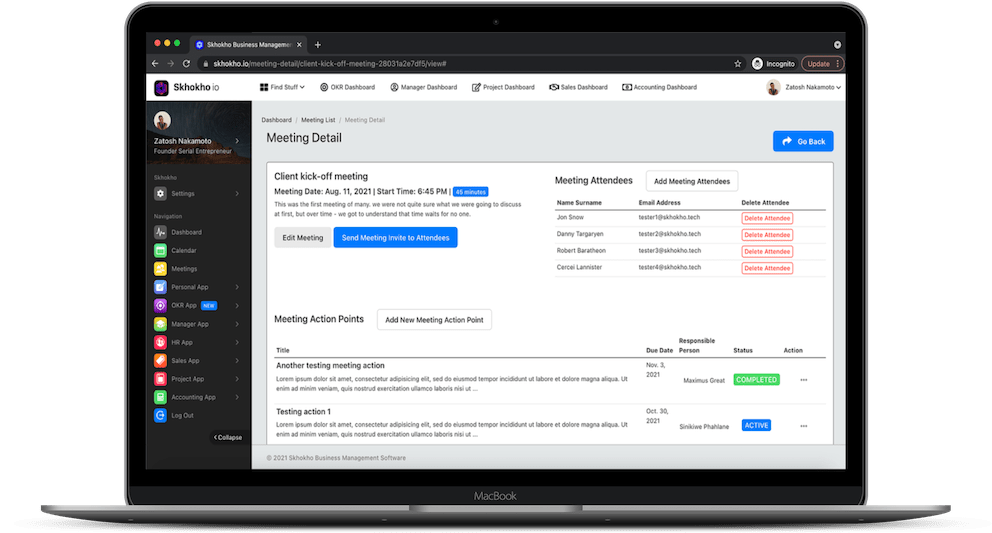
Use cases for meeting management software: Keep Track of All Your Meetings
- Let us say you want to capture and keep a record of what you talked with a customer for reference purposes, use sales and CRM tracking. When you’re chasing many possibilities at the same time, keeping track of everything becomes difficult.
- When you need to keep a record of discussion topics, action goals from project meetings, and communication between your team members and the client, you’ll need to use project management.
- Documenting crucial team discussions with your department and teams, hold management meetings.
- Meeting Software for Planning and Goal Setting – When your team settles on the objectives and targets, meeting software can assist in keeping track of the topics of contention and activities.
- Board meetings – maintaining account of the topics discussed, decisions made, and actions taken during board meetings. Meeting software can help you keep track of when a meeting took place, who was there, who received minutes, and what was discussed.
Get started with Skhokho Meeting Management Software: Keep Track of All Your Meetings
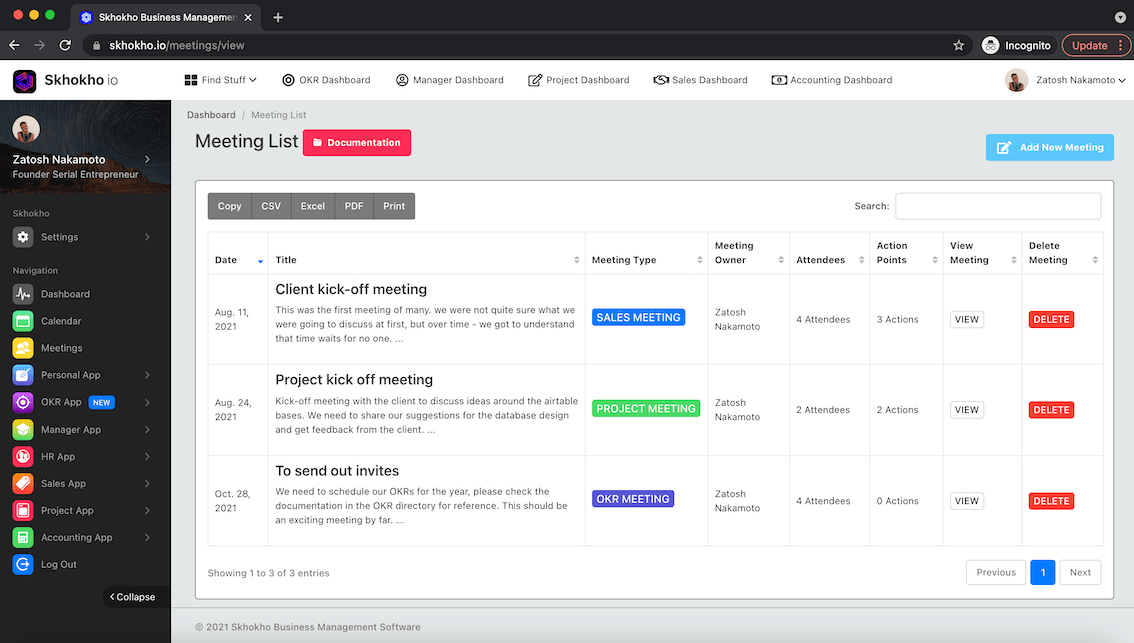
Skhokho Meeting Management Software makes it easy to keep track of all of these documents in one spot. When you’re ready, go to the meeting app and start a new meeting. You can then select all of the participants in advance and send them an iCalendar invitation, whether or not they are Skhokho users. They’ll get an email with a meeting invitation that they can approve, and the session will be added to their calendar.
Skhokho meeting software isn’t a conference call or scheduling software like Zoom or Calendly; instead, it does the following:
- Allow you to plan for meetings in advance by setting a time and date for the meeting
- Enable you to send meeting invites to meeting attendees from the app
- Help you record the action points during a meeting, in written format
- Allow you to send out pdf minutes of meeting to all meeting attendees after the meeting has taken place
- Provide a safe place to store all your meeting records – so you can browse through them in future
Tracking What Was Previously Discussed
Meeting management software like Skhokho helps us to keep track of “meeting actions.” Because actions will be discussed at the meeting, it is a great way to prepare ahead of time. You can also review your meeting recordings and take notes on the actions taken during the meeting.
After you’ve recorded an activity, you’ll need to designate a responsible person for it and set a deadline for it to be completed.
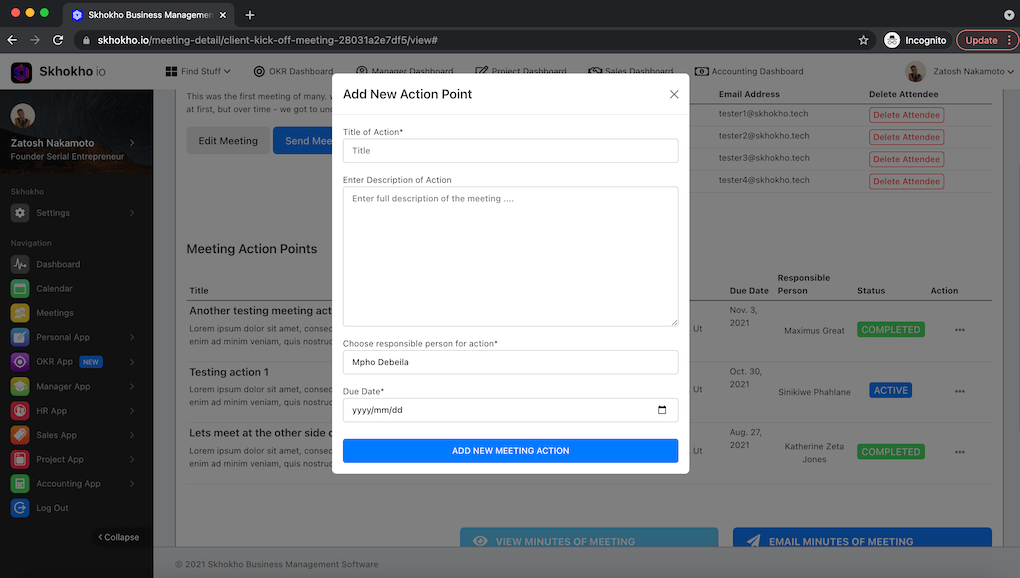
Meeting actions can be in one of two states: initiated and underway, or accomplished. When a meeting action is done, the meeting organiser should record it in the meeting minutes as completed.
Sharing minutes
With a single click, you can send a PDF document of the meeting minutes to whoever was registered as a meeting participant using Skhokho Meeting software.
Meeting attendees who are members of the Skhokho organization can also view the meeting minutes in their meeting software. They will be able to access and retrieve the minutes at any point down the road.
Sign up for Skhokho Meeting Software
Skhokho meeting software is included in the Skhokho suite of business apps, which is targeted for mobile businesses. The base package, which costs $20, includes a generic meeting app with all of the features listed above.
To get started with Skhokho OKR, simply register for a 14 day obligation free trial, no strings attached here:
Also check out The benefits of tracking expenses article.
Get in touch with us at hello[at]skhokho.tech

Leave a Reply